Practical sales page guide
A sales page template for a small service business
Use seven buyer questions to explain a service without filling the page with generic claims.
By Business Tutorials ·
1. Who is this for?
State the customer and the situation. “For independent consultants with an existing homepage” gives the reader a way to recognise themselves. “For everyone who wants success” does not. Add a short exclusion when it prevents a predictable misunderstanding.
2. What will I receive?
Describe the deliverable as if you were writing the handover email. Include its format, scope and relevant timing. For a review service, this might be an annotated document and a short walkthrough. Avoid presenting a list of tools as the result the customer buys.
3. What will we do?
Explain the process in three concrete steps: submit the required material; receive the review; apply the recommendations. Name the customer responsibilities. If the project cannot begin without an intake form or access to an existing page, say so.
4. Why should I trust the explanation?
Show a real sample or describe relevant work precisely. A fictional demonstration can teach the process, but label it as fictional and do not imply it is a client result. Qualifications and customer quotes must be accurate and used with appropriate permission.
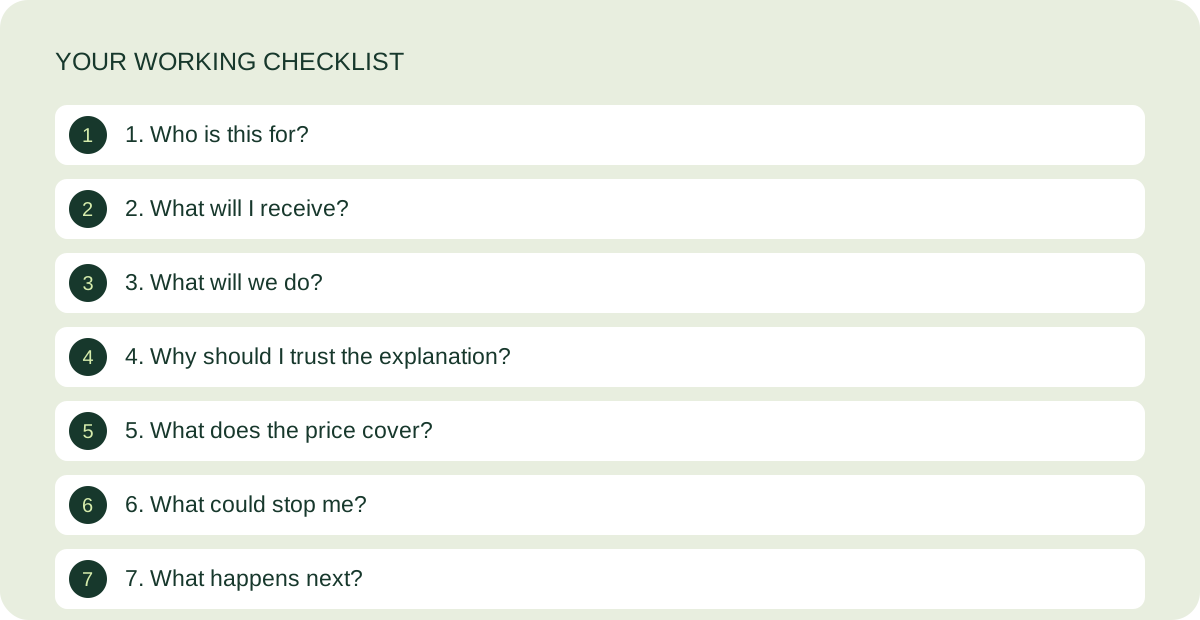
5. What does the price cover?
Place the price beside the included scope. Distinguish a one-off fee from a subscription or instalments. Include exclusions such as implementation, additional pages and follow-up revisions where they matter. Do not offer a refund or delivery promise that you cannot honour.
6. What could stop me?
Answer practical questions: do I need an existing page, which materials do I send, who makes the changes, and what is outside the service? Use questions from real enquiries when available. Do not use the FAQ to introduce an entirely different offer.
7. What happens next?
Choose one main action. If the buyer needs a scoping call, explain that they are requesting one rather than paying. If they can buy immediately, connect the button to the correct checkout. Test the confirmation and delivery instructions, not just the button colour.
The guided video workshop is in preparation. Start with the free kit while the lessons and customer journey are being completed.
Keep working on your page
How to write a clear sales page headline
Three drafting patterns, with examples and a simple accuracy check.
Read the guide ↗
Features vs benefits: examples for services and courses
Translate what is included into why it matters, without inventing outcomes.
Read the guide ↗